AI & Security
From Shadow AI to an Approved AI Workspace — Part 2
A safer AI policy needs a useful place to work. Build an approved starting point with clear data boundaries, limited permissions and people responsible for the results.

Let Nexus read this article to you.
Uptime AI & Security’s executive assistant.
AI narration by Nexus · Tech Pulse intro/outro. Full transcript below.
Follow The Uptime Brief
Share this article
In Part 1, we looked at how a helpful AI shortcut can move business information outside approved systems. The next step is to give people a useful place to do the work they were trying to do in the first place.
Consider a hypothetical office where one person drafts emails in a personal chatbot, another installs a meeting assistant, and a third uploads documents to a free summarizer. Each person has solved a small problem. Together, they have created a collection of accounts, terms, sharing settings and unanswered questions.
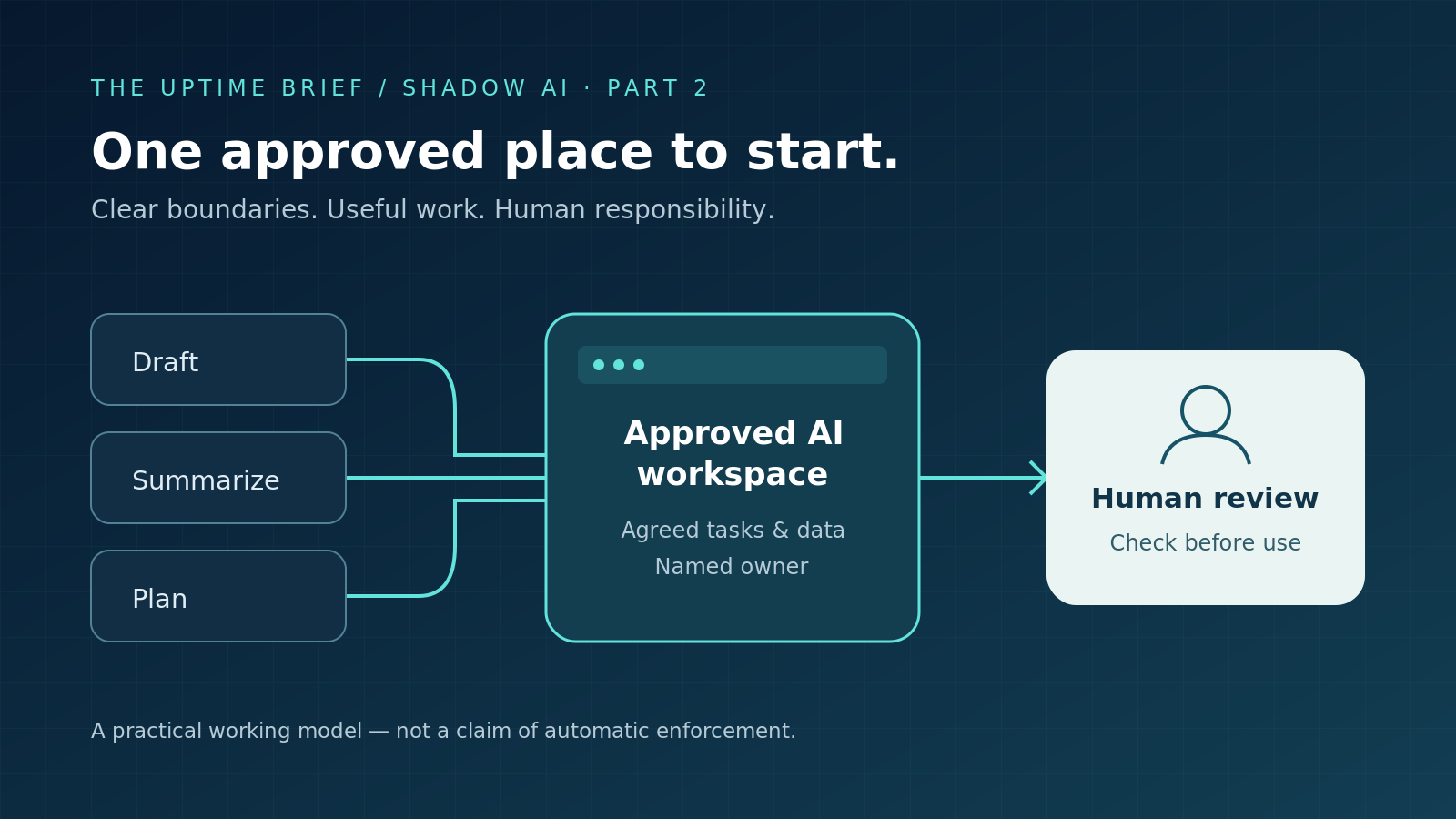
One approved AI workspace gives the team a clearer starting point: where to go, what information is allowed, who can help and which decisions still need a person. Its value depends on those choices being explicit and workable.
Make the approved place useful
An approved workspace is a company-selected environment for agreed AI tasks, with company-managed access and an identified owner. It could be a business AI service configured for your team. It does not have to mean building your own model or buying every feature at once.
Start by asking employees what they already need help with. Is it rewriting public-facing copy, outlining a proposal or turning a public document into a checklist? The NCSC recommends understanding why people use unapproved AI and providing alternatives that meet business needs. A policy that gives people no usable route leaves the original problem unsolved.
Choose a small set of tasks the workspace handles well. Provide the sign-in link, a short demonstration and a place to request help. Keep an exception process for work it cannot handle. One approved starting point should reduce confusion without pretending every task belongs in the same tool.
Approve the data and the task, not just the logo
Before inviting the team, review the exact product, subscription and settings you intend to use. Ask where prompts and files go, how long they remain, who can access them, how deletion works and what changes when a connector or third-party tool is enabled. Record answers and unresolved questions with a named owner.
For example, OpenAI says it does not train models on business data by default. That is a specific commitment, not a statement that data is never stored. Its privacy page lists configurable retention for certain offerings, including Enterprise, rather than every account. Check the plan you are buying instead of transferring one product's promises to another.
For an initial pilot, use public or synthetic material. Treat credentials, confidential customer records and sensitive employee information as out of scope unless a separate review explicitly permits that use. Removing a name alone may not remove identifying details. If someone is unsure, give them a person to ask before they upload.
Write boundaries employees can actually use
A short working agreement is easier to follow when it describes real tasks. For a hypothetical pilot, it might say: use the company workspace to draft from public product information; check every factual claim; have the account owner approve the finished message; do not upload customer files or connect an inbox.
Make the boundaries visible inside onboarding and everyday instructions. Name who approves new uses, who handles access changes and where to report an accidental upload or unexpected result. If something goes wrong, staff need a clear reporting route and support, not a reason to hide it.
Describe which boundaries are enforced by settings and which depend on staff following the agreement. A written rule does not automatically block uploads or prevent use of another website. Test the controls you rely on, and record gaps before expanding access.
Keep people responsible for the result
An answer can sound polished and still contain an invented fact, a missed condition or an unsuitable recommendation. For a proposal draft, the reviewer should check the customer's requirements, prices, delivery commitments and supporting sources before it leaves the business. Review means comparing the output with reliable information, not simply clicking approve.
Separate help with drafting from permission to act. A tool that can send messages, change records or run commands needs a different review from a chatbot that suggests wording. Start with no connected write access and add only the permissions a reviewed task needs.
Joint guidance published by the Canadian Centre for Cyber Security advises cautious adoption of agentic AI, low-risk non-sensitive tasks and no broad or unrestricted access. An approved workspace does not make unrestricted agent access appropriate.
Canadian Centre for Cyber Security · Careful adoption of agentic AI
Run a small pilot, then decide what earned expansion
Choose a few volunteers and one recurring task. Before starting, write down what a good result looks like and how someone will check it. Keep examples of acceptable inputs and outputs using material you are allowed to retain.
During the pilot, count useful results, corrections, time spent reviewing and requests the workspace could not handle. Ask whether people still reach for personal accounts and why. A fast draft that requires extensive repair may not save time overall.
At the review, decide whether to improve the instructions, change the tool, narrow the task or expand the pilot. Test what happens when someone leaves the team and when a connector is disabled. Revisit settings and terms when the service changes.
NIST's AI Risk Management Framework organizes ongoing work around governing, mapping, measuring and managing risk. Its guidance is voluntary and adaptable. Using it can structure a review; it does not certify a workspace or establish that a business meets every legal obligation.
Where Uptime can help
A useful conversation with Uptime AI & Security starts with the workflow: what staff are trying to accomplish, which information is involved and what must remain a human decision. Uptime's AI service approach describes identifying bottlenecks, defining approved knowledge and escalation rules, configuring workflows around existing tools, and measuring results.
Use that conversation to agree a concrete scope: the pilot task, the chosen service, permitted data, access requirements, review steps and a way to assess results. Ask which controls are available now, which require configuration or another provider, and which are proposed work. Get those answers before treating a workspace as approved.
This is not a claim that Uptime currently provides a universal employee AI workspace with complete governance, data isolation, regulatory compliance or automatic enforcement. Those requirements need evidence for the specific solution and deployment. Your business still owns its policies, approvals and decisions.
The practical goal is straightforward: give employees a useful approved route, make its limits understandable and improve it as you learn. Start with one task your team repeats, and one clear standard for checking the result.
Sources & further reading
These resources provide context for the data-handling and governance principles discussed above.
- NCSC · The hidden risks of shadow AI
Understand employee needs and provide suitable approved alternatives.
- OpenAI · Enterprise privacy
Product-specific business data commitments; training and retention are separate questions.
- Canadian Centre for Cyber Security · Careful adoption of agentic AI
Joint guidance on limited access and low-risk, non-sensitive tasks.
- NIST · AI Risk Management Framework Core
Ongoing risk management tailored to the organization.
- Uptime · AI & Automation
Uptime's stated workflow scoping and deployment approach; agree implementation details for your project.
- NIST · Generative AI Profile
Companion guidance for identifying and managing generative AI risks.
Start a conversation
What does responsible AI look like in your business?
Let’s talk about your workflows, your people, and the next practical step.
Talk to Uptime